Normale Ansicht

V6.12 Game overview screen: Score margins & more

Von: Suzan
07. April 2026 um 13:35

On the Game overview screen an extra statistics section has now been added to the Stats Segment: Score margins!

The Score Margins sections shows the win and loss margins for plays of a game. Details about Score Margins can be found here: Score Margins.

Also new on the Game overview:

Tap bar chart data

For all relevant bar charts it is now possible to tap on it to view the related play(s). You can recognise these lines by the > at the end. This option is available with the Power expansion.

Dropdown menu for Stats Segment

Tap the name of the Stats Segment to access the drop-down menu and quickly switch between sections.


More information about all these stats sections can be found here: Game page – Stats segment.

V6.11 Grid view on the Games list

Von: Suzan
18. März 2026 um 22:48

The Games list now has a third option: Grid view!

You can view just the box covers, or choose to show Game name, Play count, Sort or Filter data (for instance: when you sort on Year published, this will show the Year) and Collection status.

How to enable Grid view

Tap on the green gear icon on the top right of the Games list and select Grid view.

List View Settings

Tap on the green gear icon on the top right of the Games list and select List View Settings.

Here you can enable one or more of the following:

  • Game name
  • Play count
  • Sort or Filter data (for instance: when you sort on Year published, this will show the Year)
  • Collection status

All information about List View Settings can be found here: Games list view settings.

V6.10 QR scanner, Challenge option and more!

Von: Suzan
11. März 2026 um 11:53
QR scanner

From v6.10 there is a QR scanner on the Overview screen, this can be used to scan shared Play QR-codes directly from the app!

Challenge option

For all relevant challenges an option was added that, if enabled, makes sure plays that are counted for a challenge actually appear in the challenge.

This situation could happen in Challenges where there is a filter on Play count: when you play a Game the Play count goes up and the game was no longer eligible in the Challenge.

The option will be enabled by default for new Challenges, and can be enabled in older challenges by editing the Challenge.

More

The following has also been added/improved:

  • Switching between score sheets (generic, round, game) transfers entered scores.
  • Changing location of a play no longer updates to default players once they have been edited in that play.
  • Grouped Plays list View options in a submenu.
  • Updated tab bar icons.
  • Improved display of board/variants and roles in several locations.

V6.9 More Math options in score fields

Von: Suzan
03. Februar 2026 um 14:01

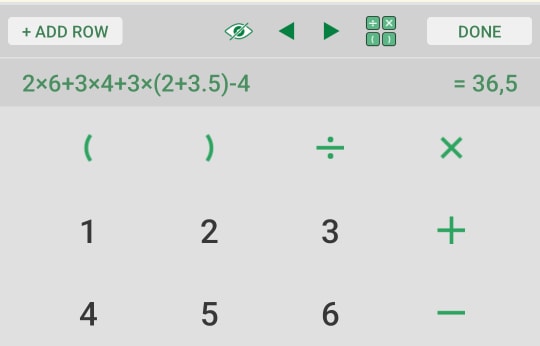
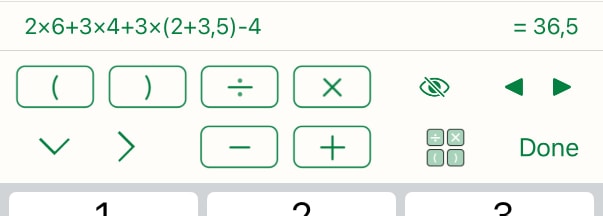
With this version it is now possible to add more calculations to score fields.

After addition and subtraction that were already possible, you can now multiply and divide.

Using the parentheses you can combine multiple of these calculations in one score field.

The entire calculation is saved in the score field, so you can always view and or edit it later!

Read more about it here: Calculations

Android math buttons
iOS math buttons

New publisher avatars

The publishers Minerva Tabletop Games and Steinbock Brettspiele have allowed us to add some of the characters in their games as avatars in the app.

The Minerva Tabletop Games avatars are from their game Crumbs! The Sandwich Filler Game with art from BG Stats avatar veteran Rory Muldoon.

The Steinbock Brettspiele avatars are from their games Der König des Waldes and Bobbidi Boom with art from respectively Roland Deaconu and Lorenzo Fornaciari.

image by Roland Deaconu
from Der König des Waldes
images by Rory Muldoon, from Crumbs! The Sandwich
Filler Game

Please see our Score sheet page here: Requesting score sheets for an update on requesting score sheets.

V6.8 Achievement Level editor and more for Insights

Von: Suzan
24. Dezember 2025 um 15:56

The final new features we bring to the app in 2025 are all for Insights!

Available for everyone, we have added the Achievement level Editor!

The Achievement level Editor lets you create your own achievement levels on the Games tab, with custom colours!

You can:

  • Disable or change the colour for the default achievement levels
  • Add as many levels as you like
  • Change colours for Light and Dark mode
  • See your levels in the legend at the top of the list of Games

All options of the Achievement level Editor are explained here: Insights.

You can also find this explanation by tapping on “More info…” at the bottom of the Achievement level Editor page.

Two new features added on the Players tab are:

  • An icon to indicate new players: players that have their first logged play in your app in the selected period

  • ‘P-index’ line: similar to the H-index, this line represents: x players played at least x times when sorted on Plays, and x players played at least x games when sorted on Games.
Players tab

For users of the Power expansion the following is also added:

On the Games tab:

  • Option to display My Rating for a Game.
  • Option to display Days played for a Game.

On the Players tab:

  • Option to display Total time played for a Player.
  • Option to display Days played for a Player.
Games tab

Year Stats 2025

Von: Suzan
11. Dezember 2025 um 13:15

You might want to wait to include your holiday gaming, but if you can’t, our annual Year Stats are available now!

After all the options added last year, still more is possible this year! Optionally change lists to Artists, Categories and/or Mechanics.

When you’ve updated to version 6.7, you will see the Year Stats banner on the main overview screen of the app. Tap this banner to go directly to your Year Stats! (depending on your stats and device this may take a little while)

The Year Stats will be created from your Insights, with the period 2025. The default sorting of the list of games will be on Play count.*

You can go to Insights from your Year Stats, change any filters you want and go back to the Year Stats through the Share menu, option “Year Stats“. Here you can for instance use the new Digital play tag!**

Example BG Stats Year Stats 2025

If you’ve accidentally closed the banner you can enable it by going to Settings –> View and Share your 2025 stats.

Don’t forget to mention us and use #bgstats when you share!

* Your previously selected Insights settings like filters and sorting are temporarily replaced. When you leave the Year Stats and Insights screen without making adjustments, the next time you open Insights your original settings will be restored.
** available with the Power expansion.

Options on the Year Stats screen

The options on the Year Stats screen are the same as on the Stats-o-grapic. You can read all about these options here: Stats-o-graphic. Below the differences and new options are described. These new options will also be available on the Stats-o-graphic from now on!

Background

Year Stats have their own background. You can choose to keep this (Option ‘Standard‘) or change it to the option ‘Game‘.

  • Game: the background will automatically be generated from the cover image of your top game.
  • Standard: choose this to use the standard Year Stats background colour.
New list options

Two options are added. Here you can select what is to be displayed in the top and bottom lists. When opening the Year Stats the app estimates which list could be interesting for you. You can always change this:

Display (top)

Here you can select the following options:

  • Bar chart
  • Designers
  • Artists
  • Categories
  • Mechanics
And (bottom)

Here you can select the following options:

  • Designers
  • Artists
  • Categories
  • Mechanics
Combining lists

Really only interested in one of the list options? Select it for both the options and the lists will be combined.

How are Designers/Artists/Categories/Mechanics calculated?

The percentage shown for these is over all your unique played Games, not plays.

Easy to overlook options
Picture grid
  • You can tap the grid to hide a picture. Other stats are not recalculated when you do this.
Stats grid

These options are also available in the green gear menu on the Display line.

  • Tap Players to toggle between named players and all players.
  • Tap the Hours/Days row to get the option to hide it.
  • Tap any list to toggle between showing/not showing “(uncredited)

V6.6 Publisher avatars

Von: Suzan
02. Dezember 2025 um 13:48

In version 6.6 we introduce Publisher avatars!

You can now also choose an avatar from 100+ avatars based on art from more than 15 games.

The art for these avatars is provided by the publishers, big thanks goes out to:

  • CGE
  • Deep Print Games
  • Feuerland Spiele
  • The Game Builders

Setting a Publisher avatar

When selecting an Illustration, tap on “Board Game Stats” to see the original avatars, tap on “Publishers” to see these new avatars!

Tap on “About” to learn more about a publisher and to see from which games the art for the avatars came from.

More on Avatars can be found here: Avatars.

Select between “Board Game Stats” and “Publisher”

V6.5 Play Tagging

Von: Suzan
18. November 2025 um 16:56

Version 6.5 of the app introduces Play Tagging!

With Play tagging you can create groups of plays based on any criteria you want.

Use these play tags to filter the list of plays, the Game page, Insights and use them in Challenges!

The combined Play Stats will give an overview of stats of filtered plays, a perfect recap for a gaming weekend or series of plays.

If you have imported plays from BoardGameArena or Yucata previously, using the already created “Digital” play tag helps to view your stats just the way you want.

Use Play Tagging to:

  • Add any number of tags to your plays
  • Filter on Play tags throughout the app
  • View combined Play Stats
  • Use a “Digital” tag to filter online plays
  • Use Play tags in Challenges
  • Optionally post Play tags to BGG as comment
Example Play Stats

You can read all about Play tagging on our Tagging page. Tagging is part of the Power expansion.


Tip: “Digital” tag

You can add the “Digital” tag to any play you want, but you can also add the tag to previous plays with Multiple Select.
As an example, if you logged some plays on the location “Watergate app“:

  • Go to the “Watergate app” Location
  • Tap ‘Select‘ at the top of the screen (this is the word ‘Select’ on iOS and lines with a checkmark on Android)
  • Tap ‘All‘ at the bottom of the screen (or only select the plays you want to tag)
  • Tap ‘Edit…
  • Tap ‘Edit Tags…

In v6.4.1 Catalan becomes the 16th language in BG Stats!

Von: Suzan
11. November 2025 um 14:52

We want to thank our wonderful volunteers who worked very hard on translating the app into Catalan!

This is the 16th language in BG Stats after: Chinese (simplified), Czech, Dutch, English, Finnish, French, German, Icelandic, Italian, Korean, Polish, Portuguese, Spanish, Swedish and Ukrainian!

Activating a different language in the app
Go to Settings –> App Settings –> Language

We are very grateful for all our translators for not only translating the app, but also for their continued support with translating new features!

V6.4 Power expansion replaces Deep Stats and Tagging

Von: Suzan
08. November 2025 um 13:27

Power Expansion

More stats, filtering and tagging!

The Power expansion combines the previous two expansions: Deep Stats and Tagging into one.

This gives us the ability to create new features that use parts of both these older expansions. A new feature like this will come to the app soon!

What will happen for you?

If you already own the Deep Stats and/or Tagging expansion, you will automatically get the Power expansion, including all features. This can only add options, nothing will be removed.

More information about the Power expansion

You can read about all features here: Power Expansion.

Most Popular New Game Award 2025

Von: Suzan
21. Oktober 2025 um 16:22

For the fourth time we have awarded our annual Most Popular New Game Award. This year the award went to Johan Benvenuto for his game Harmonies!

This year the award could not be handed over at Spiel, so it was send to the designer in France.

Congratulations to the winner Harmonies, designer Johan Benvenuto, and the whole team behind creating this game!

Harmonies box with the BG Stats award and a golden BG Stats button
How is the winner of the Award determined?

Games that are released in 2024 are eligible. The popularity of the game is determined as follows: we looked at the unique users that logged at least one play of a game between 7 October 2024 and August 2025. The new game that was logged by the most unique users, Harmonies in this case, won. This means it doesn’t matter how many times a user played the game, or how many people were in the game.

V6.3 Some much requested features!

Von: Suzan
10. Oktober 2025 um 22:01

In version 6.3 we’ve added some much requested features throughout the app:

1) Option to display the game image in the list of plays

You can now set if you want to see the game image in the Plays list.

Tap the green Gear icon at the top of the list and choose “Display game image“.

This can be combined with Avatars, Expansions and Board/variants.

Plays list

2) View related plays for roles & players from Game page

In the “Statistics per:” section on the game page you can now tap a Player or Role. This will show you a list of related plays. If you tapped a:

  • Role – you’ll see a list of Plays where this Role is used
  • Player – you’ll see a list of Plays with this Player
  • Role > Player – you’ll see a list of Plays with this Player using this Role
  • Player > Role – you’ll see a list of Plays where this Role is used by this Player

(Available with the Deep Stats expansion)

View plays for a Role

3) Added randomizer to Board/Variant screen

It is now possible to select a random Board/Variant when logging a play.

You can read about all options of the Board/Variant randomizer here: Board/variant Randomizer

Board/Variant randomizer

4) Role randomizer can select additional items

It is now possible to let the randomizer select additional Roles after one or more Roles are already selected for a Player.

You can read about all options of the Role randomizer here: Role Randomizer.

Role randomizer

5) Show number of Players when logging a play

You can now see the number of players at the top of the Player list when logging a New Play (if more than 4).

You can also see the number of selected players at the top of the Player selector screen.

Selected players

6) Show absolute numbers next to percentage in pie chart legends

When you tap on a pie chart, you will see percentages and absolute numbers for each entry in the legend.

Days of week pie chart

V6.2 a lot of small visible and invisible improvements

Von: Suzan
25. September 2025 um 11:38

The most noticeable updates are

  • The ability to add an expansion to a New play from the Score Sheet page
  • A short cut to adding a Custom Player image was added when viewing an Avatar
  • Plays are now marked as updated when a Player or Location in that play are updated.

This last change has the unexpected effect that updating Player’s avatars (or Player image) will also set plays for this Player as needs to be updated. We are working on an update to prevent this.

Multiple select

You can post all unposted and updated plays to BGG in one go with Multiple Select:

  • Go to the Plays screen
  • Tap on the gear icon and tap on “Select all Unposted plays
  • Tap ‘Share… ‘
  • Tap ‘Post or Update to BGG‘.

How do I see if a play is updated?

From our FAQ:

What does the green bullet or open circle mean on the Plays list?
A filled green circle means: the play is not posted to BGG.
An open green circle means: the play is posted to BGG, but updated in the app since then.
You can enable display of the circles in the BGG settings in the app.

How can I see all changes in this update?

You can go to the Version History on our site, or check the Version History in the app through: Settings –> Help, About and Contact –> Version History

V6.1 More for Avatars

Von: Suzan
08. August 2025 um 16:30

In this new version of the app there are more Avatar options, more Avatar settings and more Avatars!

Changing multiple Avatars

You can now use Multiple Select to set Illustrations, Background colours and Shapes for multiple selected Players. This makes it even easier to visually create a group of Players!

Avatar Settings

It is now possible to:

  • Choose to set a random color for default Avatars: when no Avatar is assigned, the background colour of the default Avatar will be random.
  • Choose where you want to see Avatars: Overview, Plays list, Play overview and Edit Play screen.
  • Choose the default Avatar import settings: this will be used whenever you import Plays (can always be changed on the Import matching screen).

Read more about Avatars and all options here: Avatars

More Avatars

Illustrator Annika was so generous to create another illustration!

You can now use her chameleon to create even more Avatars.

Her range of pöppels is also expanded with 5 new colours!

Published — 27. Juni 2025 Board Game Stats

V6.0 Avatars & more

Von: Suzan
27. Juni 2025 um 16:02

We are really excited to introduce Avatars in BG Stats!

Avatars offer a way, in just three steps, to easily and quickly create a beautiful picture to use as your player icon.

Multiple talented artists created sets of illustrations you can use together with a background colour and a shape to create a unique Avatar for you and other Players in the app.

The Illustrations you can choose from are created by the following 5 talented artists:

Select your own Avatar, (optionally) receive your friends Avatars when they share plays, or create sets of Avatars with the same background colour or shape for different game groups!

With 50 illustrations, 450+ colours and more than 25 shapes you can make each players avatar unique!

Select illustration
Select background colour
Select shape
Receiving Avatars

On the Matching screen, when you import a play file / QR code, you can choose which avatars to import, so you can use a players own chosen avatar in your app. Or you can keep the avatar you’ve chosen for that player yourself!

Avatars on the Plays list

On the plays list there is an option to show avatars for all players, or just the winner(s).

Plays list

Plays list: options to show Board/variants

On the Plays list it is now possible to show board/variants for plays. Just like expansions, you can now toggle “Display board/variants” in the gear menu at the top right of the list.

Hungarian

We are very proud that thanks to the hard work of our wonderful volunteers Hungarian becomes the 16th language in BG Stats!

Languages already available are: Chinese (simplified), Czech, Dutch, English, Finnish, French, German, Icelandic, Italian, Korean, Polish, Portuguese, Spanish, Swedish and Ukrainian!

Activating a different language in the app
Go to Settings –> App Settings –> Language

We are very grateful for all our translators for not only translating the app, but also for their continued support with translating new features!

Published — 02. Juni 2025 Board Game Stats

V5.8 Personal Ratings

Von: Suzan
02. Juni 2025 um 15:13

As you may have seen already, over the last week a new update has been rolled out: version 5.8 with Personal Ratings!

With Ratings in BG Stats you will be able to rate games, as well as filter and sort on your own ratings.

Personal rating

If you have Collection sync enabled your rating will automatically be synced with BGG as well.

You can find all information about Ratings here: Rating Games

Slider to set rating

Enabling Ratings

If you haven’t done so already, you can read how to enable Ratings here: Enabling Personal Ratings

V5.7 Share plays with a QR code

Von: Suzan
08. April 2025 um 16:25

From version 5.7 it is possible to create a QR code to share your play(s). Let friends* scan the code direct from your phone or send the image or link whichever way you like!

Creating a QR code for sharing play(s) works exactly like sharing play files, just choose the option “Share via QR code” instead.

More information can be found here: Sharing plays using a QR code.

* BG Stats users with version 5.7 or higher

Cloud services working again

Von: Suzan
31. März 2025 um 10:08

After a weekend of lots of communication with our hosting provider Cloud services (Cloud sync and Score Sheet templates) are working again. If you encounter any problems please let us know!

As an apology for the extended outage and any inconvenience, we’ve added 14 days to all active Cloud sync subscriptions.

What went wrong?

On Friday March 28th in the afternoon (UTC) our Cloud services stopped working in the app.
The services were up and running again at March 30, 22:53 UTC.

Our hosting provider placed our domain into protective mode, the most common cause for this is a DDoS attack. After adding extra preventative measures to our domain the protection was lifted, and all services resumed.

With these new measures we are working on making these services more resilient in the future.

In v5.6.1 Korean becomes the 15th language in BG Stats!

Von: Suzan
27. Februar 2025 um 22:52

We want to thank our wonderful volunteers who worked very hard on translating the app into Korean!

This is the 15th language in BG Stats after: Chinese (simplified), Czech, Dutch, English, Finnish, French, German, Icelandic, Italian, Polish, Portuguese, Spanish, Swedish and Ukrainian!

Activating a different language in the app
Go to Settings –> App Settings –> Language

We are very grateful for all our translators for not only translating the app, but also for their continued support with translating new features!

Other improvements

This update also contains an improved Game Collection screen showing all details. And of course, as always, some bug fixes, visual and other improvements, you can see all details in the Version history

❌